
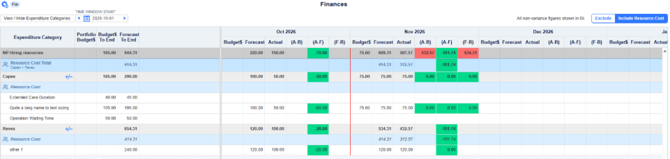
Projects can now include the cost of their planned resource effort in their finances. A new Exclude / Include Resource Cost switch on the Plan > Finances screen adds Resource Cost rows to the Capex (capital) and Revex (revenue) categories. This shows how your resource requirements contribute to the overall cost of delivery.
Resource costs are excluded by default, so the Finances screen works as it always has until you switch them on.
This article covers resource costs on the Plan > Finances screen only. To view resource allocations as cost on the Resource Summary page, see [Link: Resource Summary cost article].

Before you start
Resource costs are calculated from your resource plan, so the following need to be in place:
- Resource allocations: resources allocated to the project, with planned effort in the months you want to cost.
- Internal rates: an internal rate set for each allocated resource
- Capitalised tasks (Capex only): resource effort is costed to Capex only when it is on a capitalised task imported from the Gantt chart.
Turning Resource costs on or off
Admins can determine if they want the ability to show the Exclude / Include Resource Cost switch.This can be toggled on or off under Admin > General settingsWhen the switch is set to Exclude (the default), the page works as it has historically.
When it is set to Include Resource Cost:
- Resource Cost rows: the Capex and Revex categories each get a Resource Cost row showing the monthly cost of the project's resources.
- How the cost is calculated: planned effort × the resource's internal rate, the same calculation used in the Resource Summary cost view. If a rate changes partway through a week, the cost is split by the days on each rate. For details, see [Link: Resource Summary cost article].
- Capex or Revex: resource costs go to Capex when the effort is on a capitalised task imported from the Gantt chart. All other resource costs go to Revex.
- Resource Cost Total row: a new row shows the combined resource cost (Capex + Revex) for the project.
- Totals: resource costs are added to the category totals, the project totals and the To End totals.
Editing your figures while resource costs are included
Resource Cost rows are read-only. They are calculated from the resource plan, so to change them, update the resource allocations or internal rates.
While Include Resource Cost is selected, any category that includes resource costs becomes a read-only total, and you can't edit its entered figures on this screen.
Switching between Include and Exclude does not delete or change your entered figures. They are kept and shown again as soon as you switch back to Exclude.
Your switch setting
Your Exclude / Include Resource Cost setting is saved for you and kept between sessions, so the Finances screen opens the way you last left it. [CONFIRM: does the setting apply to all projects, or is it remembered for each project?]
Because the setting is personal, two people looking at the same project can see different totals if one includes resource costs and the other doesn't. When sharing or discussing figures, check which setting everyone is using.
Reports and exports
The Plan > Finances print reports, Financial Measures and Financial Details, follow your switch setting, including the To End totals. Check the switch before printing so the report shows the figures you intend.
FAQs
Why is my Resource Cost row showing zero?
Check that the switch is set to Include Resource Cost, that resources are allocated with planned effort in that month, and that each resource has an internal rate.
Why are my totals different from a colleague's?
The switch setting is saved for each user. If one of you includes resource costs and the other doesn't, your totals will differ.
Will switching to Include delete my entered figures?
No. Your entered figures are kept and shown again when you switch back to Exclude.
Why can't I edit a figure on the Finances screen?
While Include Resource Cost is selected, categories that include resource costs are read-only. Set the switch to Exclude to edit them.
Why are my resource costs in Revex instead of Capex?
Resource costs go to Capex only when the effort is on a capitalised task imported from the Gantt chart. Check that the task is marked as capitalised and has been imported.