
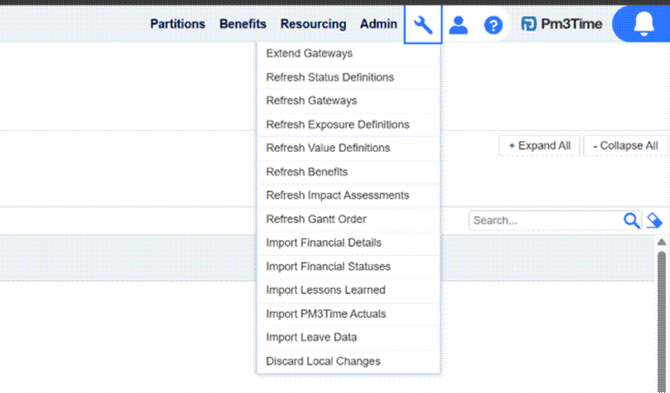
The Import Leave Data popup can be accessed from the tools icon in the top right of the screen and selecting the Import Leave Data option. It allows a user to load employee leave records for one or more employees directly into PM3 from a spreadsheet.
Clicking the Download Template button will download a pre-formatted .xlsx file containing the required column headers. Mandatory columns have a white background; optional columns have a grey background. The mandatory columns are Email, PeriodStart, PeriodEnd, StartDate, and EndDate. Optional columns are LeaveType, Duration, DurationUnits, and HoursPerDay.
PeriodStart and PeriodEnd define a cleanup window for each employee. Before inserting new records, PM3 will delete all existing leave for that employee that falls fully within this range. StartDate and EndDate are the actual dates of the leave record being imported. These do not need to match the period — it is common to set the period to a full month and the leave dates to specific days within it.
Once the template has been filled in, save the file locally, click Choose file and select it. The contents of the file will then be displayed and validated in the grid, as shown in the below screenshot.
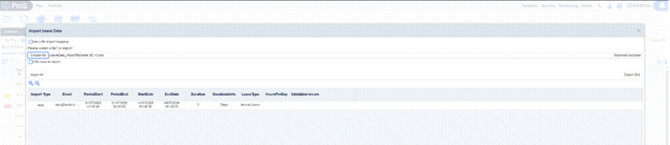
The Import Type column shows whether each row will insert a new record or replace an existing one. If there are any errors, a message will appear in the Validation Issues column on the right.
The Import Type column shows whether each row will insert a new record or replace an existing one. If there are any errors, a message will appear in the Validation Issues column on the right. All validation issues must be corrected in the file and re-uploaded before the import can proceed.
If there are no validation issues, click Import All to import the data into PM3.

If your HR system uses different column names to those in the PM3 template, an administrator can configure a file import mapping in Admin > File Import Mappings. Check Use a file import mapping in the dialog and select the appropriate mapping before choosing your file. The mapping will translate your column names to the PM3 expected fields automatically.