
At a Glance
- Further optimisations for the Gantt Chart
- Gantt Resource Planning
- Ability to import Resource Leave data from Excel file
- Brand new login screen
- PM3BI emails are now sent from a secure account using Managed Identity
Key Enhancements
Gantt Enhancments
This release introduces a range of enhancements to the Gantt Delivery Plan, focused on improving usability, providing greater flexibility for Project Managers, and aligning PM3 more closely with Microsoft Project. These changes simplify project planning, provide additional project information directly within the Gantt, and give users greater control over tracking project progress.
See here for more information on Gantt Chart Capabilities
What's New
Manual % Complete Updates
Project Managers can now manually update the % Complete value for individual tasks directly within the Gantt.
Benefits
-
- Greater flexibility when reporting project progress.
- Improved visibility of actual task completion.
- Simpler progress tracking without relying on work estimate calculations.
Additional Gantt Fields
Several new fields are now available within the Gantt table, providing Project Managers with more information without leaving the planning view.
New fields include:
- Effort
- Capitalised
These fields can be displayed alongside existing task information, making it easier to manage schedules and review project data from a single location.
Microsoft Project Alignment
The Gantt has been further aligned with Microsoft Project to provide a more familiar planning experience and improve interoperability between the two applications.
Enhancements include:
- Improved scheduling behaviour.
- Better consistency between PM3 and Microsoft Project.
- Enhanced compatibility when importing Microsoft Project schedules.
Benefits
- Easier transition for users familiar with Microsoft Project.
- Reduced manual adjustments after importing schedules.
- More consistent planning across both platforms.
Gantt Integration to Resource Planning
This release introduces integrated Resource Planning within the Gantt Delivery Plan, enabling Project Managers to allocate resources directly to project tasks and seamlessly transfer those allocations into Resource Forecasting.
This enhancement bridges the gap between project scheduling and organisational resource management, ensuring planned work is accurately reflected in resource forecasts while reducing manual effort and duplicate data entry.
What's New
Allocate Resources Directly Within the Gantt
Project Managers can now assign resources directly to tasks within the Gantt Delivery Plan.
When allocating a resource, users can specify the percentage of the resource's available time that should be dedicated to the task, providing a clear view of planned effort during project scheudling.

Benefits
-
- Plan project resources without leaving the Gantt.
- Allocate resources using percentage-based effort.
- Improve visibility of planned resource commitments during project planning.
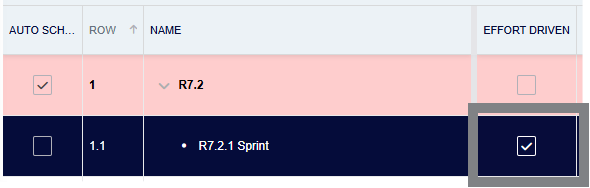
Support for Effort-Driven and Non-Effort-Driven Scheduling
Tasks can now be configured as either Effort Driven or Non-Effort Driven, providing greater flexibility in how work is scheduled.
- Effort Driven tasks automatically adjust task duration based on the amount of resource effort assigned.
- Non-Effort Driven tasks maintain a fixed duration regardless of changes to resource allocation.
This enables Project Managers to choose the most appropriate planning approach for different types of work.
Import Gantt Resource Allocations into Resource Forecasting
Resource allocations created within the Gantt can now be imported directly into the Resource Management Forecast.
This removes the need to recreate planned allocations within the Resource Management module, ensuring project plans and organisational resource forecasts remain aligned.
See here for more information on how to import Gant Tasks into Resource Forecasting
Benefits
- Eliminate duplicate resource planning activities.
- Ensure project schedules feed directly into organisational resource forecasts.
- Improve the accuracy and consistency of resource planning across PM3.
A new Gantt column update mode setting in the Resource Plan settings panel lets users toggle between Auto and Manual on a per-plan basis. In Auto mode, Gantt data is automatically applied to the Resource Plan column every time the page refreshes. In Manual mode (the default), data is only copied when the Sync Gantt to Resource Plan icon in the toolbar is clicked, giving users full control over when updates occur.

The 'Copy Gantt Work Estimates to Resource Plan' popup (previously "Import Gantt") has been updated with clearer terminology and a new option:
- To Resource Plan column — choose which column (e.g. Forecast, Actual) to copy data into
- Update option — Keep only populates cells where Gantt data exists; Clear overwrites or removes all existing data in the target column
- Past weeks' data — Keep (default) leaves historic data untouched; Replace allows past weeks to be updated according to the chosen Update option
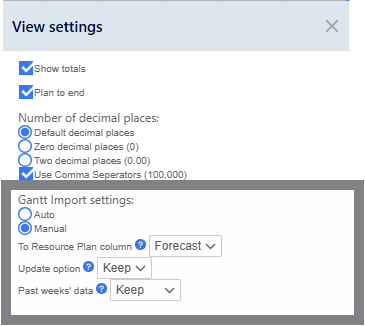
The toolbar icon tooltip has also been updated to Copy Gantt Chart Estimates, and the Resource Plan help text has been revised to reflect the new behavior.
What is the Business Value?
The introduction of Gantt Resource Planning creates a closer integration between project scheduling and resource management.
By enabling Project Managers to plan both tasks and resources from a single location and seamlessly transfer those plans into Resource Forecasting, organisations can reduce manual administration, improve forecasting accuracy, and ensure resource plans remain aligned with project delivery.
Key Benefits
- Allocate resources while building the project schedule.
- Transfer planned allocations directly into Resource Forecasting.
- Reduce duplicate data entry between planning modules.
- Improve collaboration between Project Managers and Resource Managers.
- Increase confidence in organisational resource and capacity planning.
Import resource leave data into PM3
This release introduces a built-in Resource Leave Import capability, enabling organisations to upload employee leave data directly into PM3.
Many organisations already manage annual leave, sickness, and other absences within an HR or workforce management system. Previously, this information had to be manually recreated within PM3 to ensure resource availability remained accurate. The new import functionality streamlines this process by allowing leave information to be uploaded, helping organisations maintain accurate resource availability while significantly reducing administration effort.
See here for more information on importing leave data into PM3.
What's New
Built-in Leave Import Tool
PM3 now includes a dedicated Resource Leave Import facility, allowing administrators to upload employee leave information directly into the application.
The import process has been designed to provide a simple and repeatable method for maintaining leave records across the organisation.
Benefits
- Eliminate repetitive manual leave entry.
- Import leave information quickly and consistently.
- Reduce administration time for Resource Managers and PMOs.
- Improve the accuracy of resource planning.
- Ensure capacity forecasts reflect planned leave.
- Reduce the risk of allocating unavailable resources.
Better Integration with HR Processes
The new functionality supports organisations that already maintain leave information within an external HR or workforce management system.
Rather than maintaining leave records in multiple applications, organisations can now upload approved leave into PM3 as part of their existing administrative processes.
Benefits
- Align PM3 with existing HR processes.
- Reduce duplicate data maintenance across systems.
- Improve consistency between HR records and project planning.
Business Value
The Resource Leave Import functionality removes one of the most common administrative tasks associated with resource management.
By enabling organisations to import leave information directly into PM3, resource availability remains accurate with minimal manual effort. This reduces administration overhead, improves forecasting accuracy, and ensures project plans are based on the true availability of people across the organisation.
Update Login page appearance, and introduce new PM3 logo
The Login page in R7.2 marks the beginning of a major, multi‑phase transformation of the PM3 experience. We’re investing heavily in modernising the platform’s visual design, usability, and overall feel—and this release represents the first step on that journey.
You’ll notice a refreshed Login page with a cleaner, more contemporary look. While the core functionality remains familiar, the updated design sets the tone for the wider UI improvements currently underway. This new visual direction will guide how PM3 evolves over the coming releases, bringing greater clarity, consistency, and polish across the entire product.
As part of this first phase, we’ve also introduced the new PM3 logo, replacing the legacy branding throughout the application. This updated identity reflects our commitment to a more modern, cohesive, and future‑focused PM3.
This release is just the start. You can expect further enhancements to the interface, navigation, and overall user experience as we continue rolling out the next phases of our UI modernisation programme.
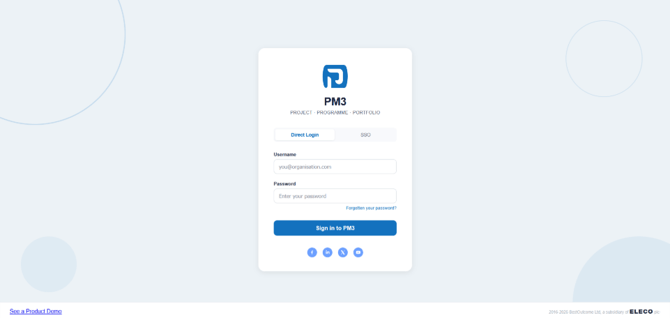
Additionally, we have replaced the old PM3 logo with the new logo seen in the screenshot above. This has been mirrored across the entire application wherever our old logo was previously used.
PM3BI
Removed Fields
- Fields that are no longer supported have been removed from the exported dataset.
- These fields will no longer appear in newly generated dataset exports.
- GetDeliveryTasks > "WorkEstimate"
- GetDeliveryTasks > "WorkEstimateUnitCode"
- GetDeliveryTasks > "WorkDone"
- GetDeliveryTasks > "WorkDoneUnitCode"
- GetDeliveryTasks > "WorkETC"
- GetDeliveryTasks > "WorkETCUnitCode
Updated Fields
- Existing fields have been updated to reflect revised business logic where applicable.
- Any changes to field calculations, mappings, or values are now applied during dataset generation.
- GetDeliveryTasks > "ParentSummaryID "- Mapping updated
- GetResourcePlanDetails > "IntRate" & "ExtRate"-Mapping updated
- GetFinancialStatus > "PeriodEndDate" - Mapping updated
- GetDeliveryTasks > "ParentSummaryID "- Mapping updated
New Fields
- New fields introduced as part of this feature are now included in the exported dataset.
- Documentation has been updated to describe the purpose and population logic of each new field.
- GetDeliveryTasks > "IsCapitalised"
- GetDeliveryTasks > "Effort"
- GetDeliveryTasks > "EffortDriven"
- GetDeliveryTasks > "EffortUnit"
- GetDeliveryTasks > "Finish"
- GetDeliveryTasks > "ResourcePercentUnits"
Technical Improvements
| #30184 | All outgoing emails now sent via secure account using Managed Identity (noreply@mypm3.com) |
| #30186 | Created filter to block sensitive data reaching the current page |
| #29919 | Enabled Manual % done progress entry for Tasks |
| #28993 | Removed Import and Export buttons from Milestone Plan |
| #29926 | Improved Import Gantt Overwrite Functionality |
| #29925 |
Disabled Resource approvals on Gantt Chart when a request is already active |
| #29924 | Added warning to Gantt Chart to inform of Gantt Resource changes affecting PM3 resourcing |
| #28625 | Change the title from 'Estimated Finish' date to 'Finish' date on the Gantt Chart |
| #30435 | Change email address in PM3 from 'https://support.bestoutcome.com' to 'https://support.mypm3.com' |
| #28257 | Added functionality to Import Leave from Spreadsheet to PM3 |
| #30248 | Updated Admin > File Import Mappings page with new fields for 'Import Leave' functionality |
| #28994 |
Added "Import and Export Milestones Only from MSP” buttons to Gantt Chart |
| #29920 | Improved Effort Driven Task behavior within Gantt |
| #29923 | Improved Resourcing allocation against a Task |
| #29927 | Updated all PM3BI calls to account for new/removed fields for Tasks |
| #29591 | Users can now scroll along the Name Column in the Gantt Chart |
| #29918 | Introduced the "Capitalised?" field in the Gantt Chart |
|
#29928 |
Updated the "Gantt Chart by Day/Week" to align with the new Gantt enhancements |
Bug Fixes
| #28662 |
Fixed issue where a PM3 licence could not be revoked due to the system still looking at deleted plans |
| #30227 | GetDeliveryTasks PM3BI Call > Added "Estimated Finish" field for Summary Tasks |
| #30175 | Removed the 'Date Raised' field from the "Add Action" popup |
| #17977 | Financial Status page - Actual + Forecast row now updates without a refresh |
| #22255 | PM3Time Integration > Manager now populating automatically |
| #27037 | Risks & Issues > Fixed issue where a UW user could not delete risks or issues |
| #28245 | Add Action > 'Assigned To' and 'Raised By' no longer greyed out |
| #26271 |
Transfer User > Fixed error that prevented the transfer from working |
| #30022 | Gantt Chart > Disabled the Workstream dropdown on Task rows |
| #30406 | Admin General > Fixed issue with Jira settings fields autocompleting unintentionally |
| #30182 |
Resource APprovals > Fixed issue where resources could not be approved |
| #29580 |
Fixed issue across PM3 where an error would display if clicking on a tab before the current one had loaded |
| #30162 | Milestone Plan > Fixed issue where certain UW users weren't able to make changes |
| #30379 | MPP Import > Fixed error when uploading 'Milestones Only' |
| #30420 | MPP Import - Fixed various errors noticed with certain files |
| #30169 | PM3BI - GetFinancialStatus > Fixed issue where the 'PeriodEndDate' field will be blank at the end of month |
| #30432 |
Resource Summary > Fixed issue where deleting forecast value on the Gantt Chart also removes the gantt value for a resource on Resource Summary page |
| #30443 |
Milestone Plan > Fixed issue where certain AW users weren't able to make changes |
| #30459 | Gateways Approval Email > Fixed error when approving |