
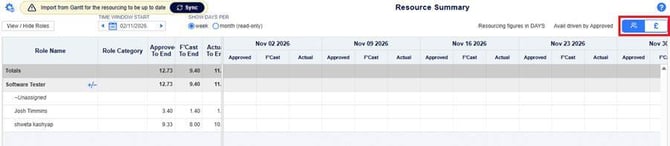
A new Effort / £ toggle switches the grid between effort and cost. This lets you review resource demand from both an operational and a financial view, without separate calculations.
Costs are calculated for Approved, Forecast and Actual effort.
The same calculation is used when you include resource costs on the Plan > Finances screen. See Including Resource Costs in Project Finances.
Before you start
Costs are calculated from each resource's internal rate, so the following need to be in place:
- Internal rates: an internal rate set for each resource, including the date any rate change takes effect.
Switching between effort and cost
Admins can determine if they want the ability to show the Exclude / Include Resource Cost switch.This can be toggled on or off under Admin > General settings
How costs are calculated
The cost for a week is that week's effort multiplied by the resource's internal rate. This applies to Approved, Forecast and Actual effort.
Cost = Effort × Rate
Example: a resource has an internal rate of £10 per hour and 20 hours of effort in a week.
Cost = 20 hours × £10 = £200
When a rate changes partway through a week
If a resource's rate changes during a week, the week's effort is apportioned by the number of the resource's working days on each rate.
Cost = (Effort × share of days on old rate × old rate) + (Effort × share of days on new rate × new rate)
Example: a resource works 5 days a week and has 20 hours of effort this week. Their rate changes from £10 to £12 per hour after the first 2 days.
- Old rate: 2 of 5 days = 40% of the effort, so 8 hours × £10 = £80
- New rate: 3 of 5 days = 60% of the effort, so 12 hours × £12 = £144
- Cost for the week: £80 + £144 = £224
Reports and exports
The Resource Summary print report follows your toggle setting. It shows costs when the toggle is set to £, and effort when it is set to Effort. Check the toggle before printing so the report shows the figures you intend.
FAQs
Why can't I edit the grid?
The toggle is set to £, and the grid is read-only in Cost mode. Select Effort to make changes.
Why is a resource's cost showing zero?
Check that the resource has effort in that week and that an internal rate is set for them.
Why doesn't a week's cost equal effort × rate?
The resource's rate may have changed during that week. The cost is then split across the old and new rates, as described in "When a rate changes partway through a week" above.
Are these the same costs shown on the Finances screen?
Yes. The Plan > Finances screen uses the same calculation when resource costs are included.
Starting fro