
At a Glance
-
Resource costs in Resource Summary: switch the grid between effort and cost with the new Effort / £ toggle.
- Resource costs in Project Finances: include the cost of planned resource effort in Capex and Revex.
- Financial Status: totals include resource costs when you include them on Plan > Finances.
- New admin setting: show or hide the resource cost switch for your whole organisation.
-
PM3BI: faster resource plan data, with new Budget, Forecast and Actual cost fields.
Before you upgrade: administrator actions
Please review these points before Release 7.3 is deployed to your instance.
- Decide whether users should see resource costs in Finances. The new Resource Cost Toggle on Admin > Customisation defaults to Show, so all users will see the Exclude / Include Resource Cost switch on Plan > Finances after the upgrade. To keep resource costs out of Finances and Financial Status, set it to Hide. See Admin > Customisation below.
- Set internal rates for your resources. Resource costs are calculated from each resource's internal rate, so resources without a rate will not have a cost calculated.
-
Resource Time Unit. Editing the Resource Time Unit from the front end is now restricted.
Key Enhancements
Resource Costing
Release 7.3 completes the Resource Costing module. Resource costs can now be viewed in Resource Summary, included in Plan > Finances and Financial Status, and hidden for your whole organisation by an administrator.
Resource Summary – viewing resource costs
A new Effort / £ toggle in the top-right of the Plan > Resource Summary screen switches the grid between effort and cost.
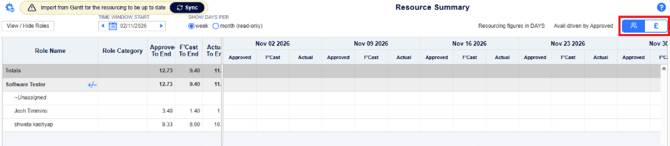
- Effort mode: the page works as it always has and is fully editable.
- Cost mode: the grid is read-only and shows the cost of each resource per week. The To End Approved / Forecast / Actual columns are pinned in the left pane, so they stay visible as you scroll.
- Calculation: each week's effort × the resource's internal rate, for Approved, Forecast and Actual effort. For example, 20 hours × £10 per hour = £200.
- Rate changes: if a rate changes partway through a week, the effort is split by the number of working days on each rate. For example, in a 5-day week with a rate change after 2 days, 40% of the effort is costed at the old rate and 60% at the new rate.
- Print report: shows costs when the toggle is set to £, and effort when it is set to Effort.
For full details and worked examples, see Viewing Resource Costs in Resource Summary.
Project Finances – Including Resource Costs
Projects can now include the cost of their planned resource effort in their finances. A new Exclude / Include Resource Cost switch sits in the header of the Plan > Finances screen, next to the currency units. It is set to Exclude by default, so the page works as it always has until a user switches resource costs on.

When the switch is set to Include Resource Cost:
- Resource Cost rows: the Capex and Revex categories each get a read-only Resource Cost row showing the monthly cost of the project's resources, calculated in the same way as on Resource Summary.
- Capex or Revex: costs go to Capex when they come from a capitalised task imported from the Gantt chart, and to Revex otherwise.
- Resource Cost Total row: shows the combined resource cost (Capex + Revex) for the project.
- Totals: resource costs are added to the category totals, project totals and To End totals.
- Editing: a category that includes resource costs becomes a read-only total. Its entered values are restored when resource costs are excluded again.
- Programmes and BCPs: Resource Cost rows show the sum of their projects' resource costs.
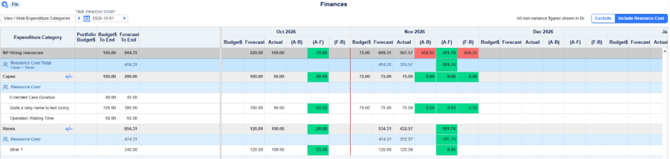
The switch setting is saved for each user and kept between sessions, so colleagues may see different totals for the same project. The Plan > Finances print reports (Financial Measures and Financial Details) follow the user's switch setting, including the To End totals.
If an administrator has set the Resource Cost Toggle to Hide, the switch is not shown and resource costs are always excluded (see Admin > Customisation below).
For full details, see Including Resource Costs in Project Finances.
Financial Status (#31176)
The Plan > Financial Status screen now includes project resource costs in the Capex, Revex and overall totals when the user has chosen Include Resource Cost on Plan > Finances. Programme and BCP figures include the resource costs of their projects.
Admin > Customisation (#31175)
A new Resource Cost Toggle (Show / Hide) setting is available on Admin > Customisation, In the section that has been renamed Plan Finance Settings.

When it is set to Hide, the Exclude / Include switch is removed from Plan > Finances, and resource costs are always excluded from Finances, Financial Status and the related print reports. The default is Show.
Users' saved choices for switch Exclude / Include Resource Cost are kept, so they apply again if the switch is shown later.
Other Enhancements and changes
Plan > Finances - Hiding expenditure items that have figures
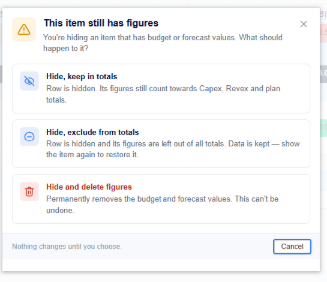
When you remove an expenditure item that still has budget or forecast figures from the always-visible list, a new dialog asks how the hidden item should be treated:
- Hide, keep in totals: the row is hidden, but its figures still count towards the Capex, Revex and project totals.
- Hide, exclude from totals: the row is hidden and its figures are left out of all totals. The data is kept, and showing the item again restores it to the totals.
- Hide and delete figures: the budget and forecast values are permanently deleted. This cannot be undone.
PM3BI
| #30979 |
The GetResourcePlanDetails function has been rewritten to improve its performance. |
Removed Fields
- No fields were removed as part of this release.
Updated Fields
- Existing fields have been updated to reflect revised business logic where applicable.
- Any changes to field calculations, mappings, or values are now applied during dataset generation.
New Fields
- New fields introduced as part of this feature are now included in the exported dataset.
Dataset
Field
Description
GetResourcePlanDetails
BudgetCost
Cost of Approved effort
GetResourcePlanDetails
ForecastCost
Cost of Forecast effort
GetResourcePlanDetails
ActualCost
Cost of Actual effort
- Documentation has been updated to describe the purpose and population logic of each new field.
Reports
| #16282 | Fixed issue where the 'Gantt Chart' report was creating hidden rows |
| #30186 | Fixed issue where the 'Status Report' was not running as a scheduled report |
| #28788 | Fixed issue where the 'Highlight Report' was not showing the correct Financial data |
| #30361 |
The 'Resource Capacity Details' print report now displays the correct data |
| #30772 |
The 'All Gateway Milestones v2' report now has a Preview available on the Plan/Portfolio reports tab |
| #29636 | Fixed issue where the 'Open Plan Status Breakdown (A3)' report content was empty when scheduled against the Organisation Root Portfolio |
| #30867 | Fixed issue where data on the 'Portfolio Resources byPlanByPerson Time Window (A3)' was not accurately pulling through |
Technical Improvements
| #30915 | The export server used for exporting the Gantt Chart to PDF has been moved to Azure App Service |
| #30346 | Upgraded from .NET8 to .NET10 |
| #30909 | Fixed bad data on certain Gantt Chart tasks |
| #30810 |
Restricted front-end editing of Resource Time Unit |
| #30862 | Fixed issue where 'SharePoint Integration with Graph API' could only find a maximum of 200 sites |
Bug Fixes
| #30742 |
Fixed issue where Radio button selection did not persist after changing pages on the Home > Plans tab |
| #30433 | Fixed issue on the 'Milestone Plan' page where an admin could not update milestones in certain cases |
| #30838 | Fixed issue on the Finances page where an Expenditure Item was showing in the table when marked as "Not Visible" |
| #30879 | Fixed issue with the 'Recent Benefits' dashlet > where the 'Forecast within the next month' dashlet always said '0' |
| #30914 | Fixed issue with the MSP Upload where Autoscheduled Tasks could not be moved |
| #30996 | Fixed issue with Milestones & Tasks displayed in inconsistent orders between the Legacy Gantt and Gantt Chart pages |
| #31095 | Fixed issue with the Resource Capacity page where it wasn't possible to see certain users |
| #30252 |
Added more fields to the 'Import Lessons Learned' functionality |
| #30758 | Fixed issue where an error message would display if saving custom report configurations without making any changes |
| #30827 | Fixed issue on the 'Benefits Definition' page it wasn't possible to delete certain values |
| #31048, #30944 |
Fixed issue where the DatePicker wpuld save a different date to the one chosen |
| #31112 |
Fixed issue on the Governance > Delivery Status page where the asterisk sign would be displayed when no unsaved changes were present |
| #31121 | Fixed issue on the 'Resource Summary' page where the View name was overlapping with the Sync message |
| #30410 | Fixed issue on the Gantt Chart where a Task would be removed from a Milestone when completed |
| #30743 | Fixed issue that occurred when trying to open the Help > Documentation link |
| #30771 | Fixed issue where the data in the Current Period of the Delivery Status Summary page data was not committing to the Previous Period |
| #30811 |
Fixed issue where the duration on auto scheduled tasks were wrongly set during the MSP import |
| #30815 |
Fixed issue on the 'Gantt Chart' page where the incorrect Validation Message would appear when adding a Completion Date earlier than the Start Date for a new task |
| #30971 | Fixed issue with the 'Import Leave' functionality where an error would occur from two duplicate data rows |
| #30999 | Fixed issue where Rich Text Fields would intermitently not save the data inputted |